Equalization
🎯 Learning Objectives
By the end of this topic, you should be able to:
- Understand the principles of equalization (EQ) in audio.
- Identify different filter types: low-pass, high-pass, band-pass, shelving, and parametric.
- Apply EQ to shape the tonal balance of instruments and vocals.
- Recognize the effect of Q-factor and gain on frequency bands.
Introduction:
Equalization (EQ) is the process of adjusting the balance of frequency components in an audio signal. It is used to correct, enhance, or creatively shape the sound.
Example Analogy: Adjusting bass, mid, and treble controls on a stereo to suit a room’s acoustics.
Physical Principles of EQ:
Frequency Spectrum
Audio signals can be represented in the frequency domain using Fourier transform:
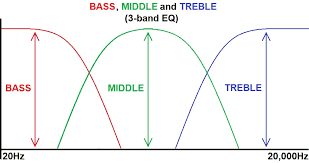
- Low frequencies (< 250 Hz): Bass and subbass
- Mid frequencies (250–4000 Hz): Vocals, melody, body of instruments
- High frequencies (> 4000 Hz): Clarity, brightness, air
Types of EQ Filters
| Filter Type | Description | Frequency Effect |
|---|---|---|
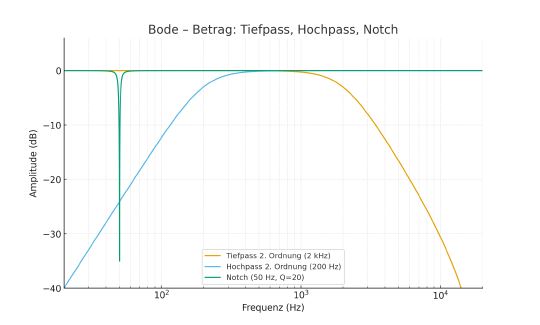
| Low-Pass (LPF) | Allows frequencies below cutoff to pass | Attenuates high frequencies |
| High-Pass (HPF) | Allows frequencies above cutoff to pass | Attenuates low frequencies |
| Band-Pass (BPF) | Passes frequencies in a band | Attenuates outside band |
| Notch / Band-Stop | Cuts a narrow frequency band | Removes hums or resonances |
| Shelving | Boosts or cuts frequencies above/below cutoff | Treble/bass control |
| Parametric | Adjustable center frequency, gain, and Q | Precise control of any band |
EQ Parameters
Center Frequency
- Denoted as
- The frequency at which a peaking EQ or shelf is applied.
Gain
- Denoted as
- Amount of boost or cut in decibels (dB).
Quality Factor (Q)
- Measures bandwidth relative to center frequency.
Where is the bandwidth in Hz.
- High Q → narrow band
- Low Q → wide band
Common EQ Types with Mathematical Forms
1. High / Low Pass Filter
- Removes low/high frequencies
- First-order transfer function:
- Fourth-order: cascade of first-order or second-order sections
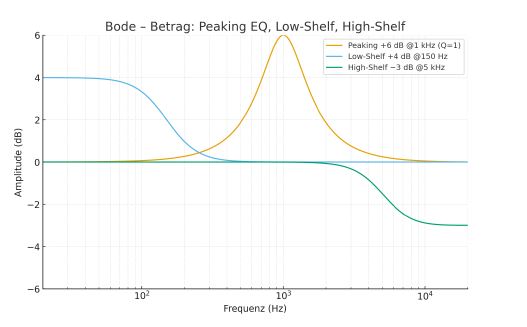
2. Peaking / Bell EQ
- Boost or cut around
3. Shelving EQ
- Low shelf: boosts/cuts below
- High shelf: boosts/cuts above
- Example: 6 dB boost low shelf:
4. Notch / Band Stop
- Very narrow cut:


Example EQ Settings
- Peaking EQ: +6 dB @ 1 kHz, Q = 1
- Low Shelf: +4 dB @ 150 Hz
- High Shelf: –3 dB @ 5 kHz
Observation:
- Uniform scales for magnitude: −6…+6 dB
- Phase: −60…+60°
- Shelving filters affect broadband phase
- Peaking EQ shows localized phase rotation around
Problem-Oriented Editing
- Remove resonances, impact noise, hum
- Use broadband boost for tonal shaping
- Use narrowband cut for specific problems
- Monitor in a treated room or with reference tracks
- Dynamic EQ can act like multiband compression for frequency-specific dynamics
Visual Demonstration
Octave Band Equalizer
📘 Explanation of EQ Parameters:
Frequency
The central frequency of the band to adjust (Hz).
- Bass: 20–250 Hz
- Midrange: 250–4000 Hz
- Treble: 4000–20000 Hz
Gain
The amount of boost or cut applied (dB).
- Positive gain: boost
- Negative gain: cut
Q-Factor / Bandwidth
Controls the width of the affected frequency band.
- Narrow Q: precise surgical adjustments
- Wide Q: gentle tone shaping
Filter Type
Determines how frequencies are shaped (LPF, HPF, BPF, shelving, notch).
🎤 Applying EQ to Specific Audio Sources
Vocals
- Use HPF to remove low rumble (< 80 Hz)
- Slight boost at 2–5 kHz for presence
- Apply narrow cuts for resonances
Drums
- Kick: boost 50–100 Hz, cut 300–500 Hz
- Snare: boost 200 Hz for body, 3–5 kHz for snap
- Overheads: smooth highs with gentle shelving
Guitar / Piano
- Adjust mids to sit in the mix
- Cut muddy low-mids 200–400 Hz
- Brighten high-end for clarity
🔁 Advanced EQ Techniques
- Dynamic EQ: Gain changes depending on input amplitude (like a multiband compressor).
- Mid/Side EQ: Separate processing for center (vocals) and sides (stereo width).
- Surgical EQ: Use narrow Q to remove resonances or unwanted frequencies without affecting the rest.
🧠 Key Takeaways
- EQ shapes the spectrum: cut for clarity, boost for vibe.
- Key types: shelving, peaking, high/low pass, notch, graphic.
- Parameters: center frequency , gain , Q factor .
- Phase response is important: wide vs narrow, shelf vs bell.
- Problem-oriented EQ enhances clarity, removes unwanted resonances, and improves tonal balance.
🧠 Quick Quiz
1) Which EQ parameter controls the width of the frequency band affected?
2) What filter type would you use to remove low-frequency rumble?
3) Which EQ is most suitable for precise removal of resonances?
4) Boosting 3–5 kHz in vocals usually affects what aspect?
5) A low Q-factor in a parametric EQ produces what kind of adjustment?